Personalize your takeaways & insights with AI





Replacing Legacy Solutions Like Spreadsheets, E-mail, InfoPath, and Paper-Based Solutions Using Power Apps & Power Automate.
Introduction: Why Business Process Automation Is Important
Most businesses don’t realize how much time they spend working through inefficiencies.
Managers spend hours trying to get approval via e-mail. Team members update the same spreadsheet in three locations. Requests sit in someone’s inbox because no one knows who should do something next. It might seem minor, but eventually it gets too difficult to manage.
These types of environments are exactly the kind in which most businesses currently operate. Legacy systems are the root cause of the majority of these kinds of issues.
Business process automation is no longer just a “nice to have.” Rather, it is the difference between being reactive and having an intentional operating model. By improving the flow of work between departments, businesses will be able to make better decisions, react more quickly, and grow without adding another layer of bureaucracy.
Microsoft Power Platform delivers a low-code solution to build apps, automate workflows, connect data, and provide insight. Additionally, you’ll be able to accomplish all of these tasks in about 1/10th of the time it would take to perform traditionally developed applications.
Using low-code Power Apps solutions and workflow orchestration in Microsoft Power Automate, businesses can leverage scalable business process automation within the Microsoft Power Platform.
By eliminating manual handoffs, increasing transparency, and enabling leadership to proactively identify potential bottlenecks before they impact operations, organizations can achieve a level of operational excellence previously unattainable.
Below, we will present examples of how organizations have used Power Apps, Power Automate, Power BI, and a governance structure to replace outdated systems and create scalable solutions without introducing chaos.
Hidden Costs of Legacy Forms & Manual Processes
While manual processes (spreadsheets, SharePoint lists, e-mail) can initially be successful, they tend to create hidden complexities over time.
For example, consider employee onboarding:
- HR sends forms to employees via email.
- IT provisionally gives employees access to company resources.
- Managers send follow-up emails to employees regarding missing information.
There is no centralized view of the entire onboarding process, simply multiple exchanges of messages and assumptions.
Ultimately:
- Errors go undiscovered until they cause major problems.
- Delays compound themselves across departments.
- Lack of accountability and visibility.
- Processes fail as the business grows.

Legacy systems such as Excel, InfoPath, and paper-based systems were designed to meet ad-hoc departmental needs. They were stopgap measures that ultimately became long-term solutions.
In addition to operational expenses related to legacy systems, there are also strategic costs associated with them. If senior leaders cannot rely upon good-quality data and/or reliable processes, decision-making will slow down.
It is then that organizations look for alternative approaches that are more organized, scalable, and able to support the changing needs of the organization.
Develop Low-Cost Business Applications with Power Apps
Replacing Fragmentation with Application-Led Workflows.
The main idea behind Power Apps is visualizing a custom application that replicates the actual manner in which your organization conducts its business, replacing a spreadsheet.
Instead of requiring teams to use inflexible and cumbersome tools, organizations can develop low-cost applications that accurately represent the real-world business processes (e.g., field inspections, service requests, approvals, and internal tracking systems).
An example of this is a logistics team that used a mobile app to replace paper-based inspection forms. Inspectors input data in real time. Photographs are taken instantly. Supervisors have instant visibility. Zero reentry. Zero delays.
This decreases cycle time, eliminates duplicated effort, and increases operational visibility among teams.
Power Apps allows organizations to link to Microsoft Office 365, SharePoint, and Dynamics so that organizational data is now part of a comprehensive data management system, rather than an isolated silo.
Benefits include:
- Reduced processing times.
- Less error-prone due to manual entry.
- Lower cost of development compared to custom-developed software.
Automate Cross-Department Workflows with Power Automate
Process Bottleneck Orchestration
If Power Apps defines how work is recorded, Power Automate defines how work flows.
What number of repetitive daily activities occur? Approvals. Notifications. Updates. Tasks during employee onboarding processes. Each of these is a repetitive task that uses people’s time and could be completed by machines.
Power Automate enables organizations to create workflows that will automatically trigger based on certain criteria or conditions.
Here’s an example:
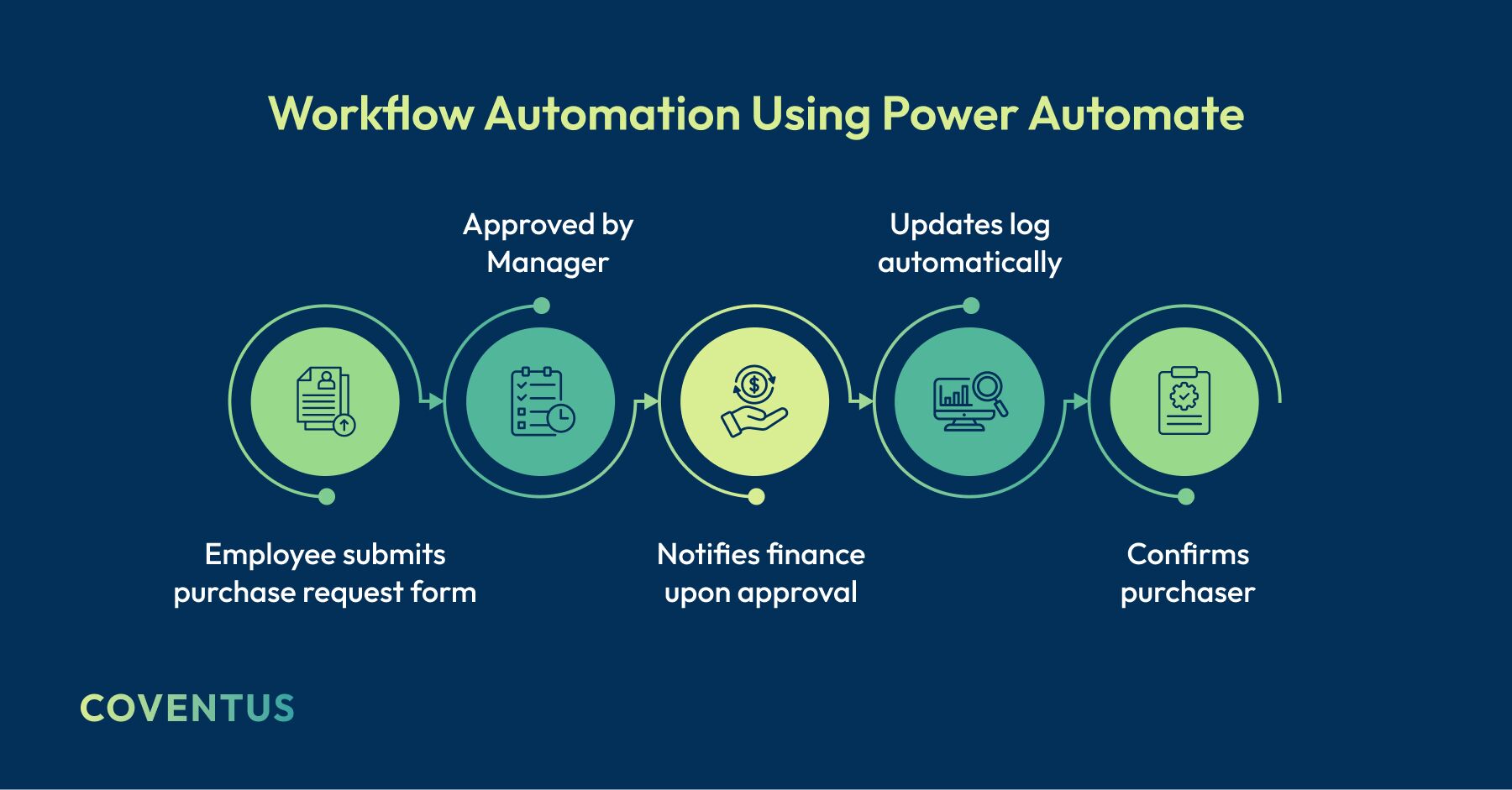
No e-mail required. No follow-up required. No skipped steps.
Eliminating manual hand-offs increases the consistency of processes across departments.
Increasing predictability of processes creates measurable results.
Leadership is able to anticipate future outcomes and proactively address bottleneck situations.
Create a Single Source of Truth for Your Organization with Intelligent Integration
Turning Point: Data as a Unifying Asset
Automation only works as well as the data supporting it. Fragmentation is common for organizations. Departmental data is spread out across different systems that cannot be shared. CRM, ERP, spreadsheets, and cloud-based applications each contain pieces of the same story.
Without integration, automation brings new levels of complexity rather than removing it.
Power Platform enables organizations to leverage connectors, APIs, and custom integration capabilities to bring together disconnected systems into a single source of truth for an organization: a characteristic commonly identified in current data architecture strategies.
Imagine a world where sales data, operational metrics, and customer interactions are synchronized nearly in real time.
Workflows become efficient:
- Approvals happen with timely and accurate data.
- Reports have one version of the truth.
- Insight synchronizes across teams.
- Improves auditing, compliance, and decision-making accuracy.
Get Live Insights into Operations with Power BI Dashboards
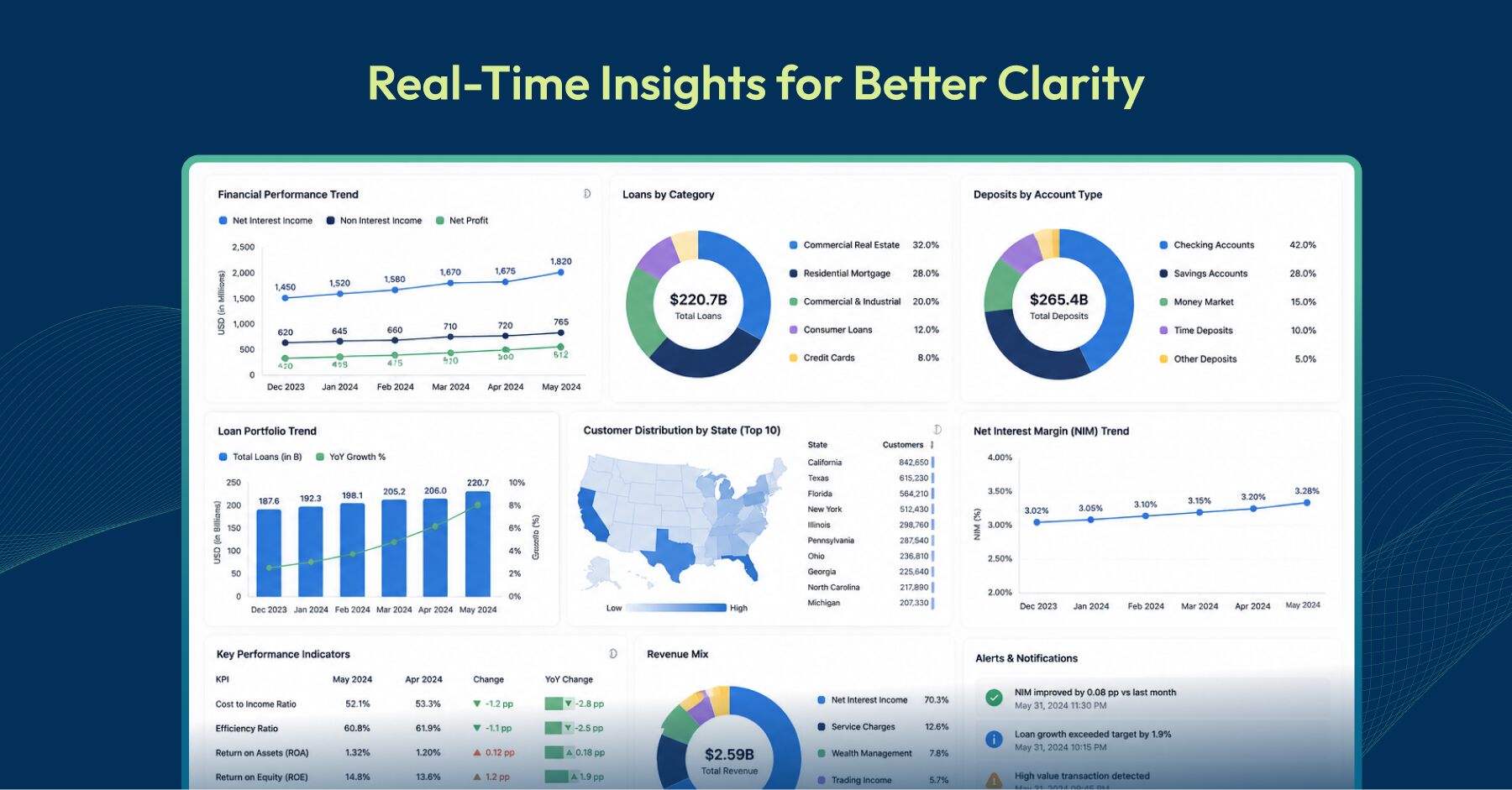
From Reporting Past Performance → To Controlling Ongoing Operations
Historical reporting is typical for most organizations: Monthly reports, weekly downloads, stale dashboards before creation.
But today’s decision makers require real-time clarity into operations. Power BI transforms operational data into real-time dashboard reports that pull data from various sources, including Power Apps, SharePoint, and external systems, and deliver them in a usable format for quick reaction.
From reacting to last week’s performance → To controlling this week’s operations.
Provide Safe Scalability Options for Organizations Through Power Platform Governance
Scaling Innovation Without Losing Control
Low-code platforms are primarily concerned with the issue of what happens when everyone starts building.
Unless structured governance frameworks (environments, security policies, and administrator controls) exist around low-code platforms, innovation rapidly turns into chaos.
To avoid this risk, Power Platform provides structured governance frameworks for safe scaling options for organizations to increase their operations.
Conclusion
Migrating from legacy systems has far-reaching consequences beyond technology. It transforms the way businesses operate by automating business processes, connecting data, and delivering insights in real-time.
Power Platform enables transitioning legacy systems to modern technologies.
Typically, organizations start with a single impactful business process and scale from that initial success.
If you want to modernize your legacy systems, Coventus can help you determine the best starting point and develop a scalable roadmap tailored for your organization.
Talk to us to identify your ideal starting point!
Share this article